Darija lesson voiceover: explain, demonstrate, then let the learner answer
Build a short Darija lesson around one worked example. Separate narration from editing notes, plan the learner's pause and check the voice before recording the course.
Start with one thing the learner should be able to do
For a course producer, a fluent recording is only part of a usable lesson. Decide what the learner should recognise or do after this segment. “Understand fractions” is broad; “distinguish one quarter from one half in a shape split into four equal parts” gives you something specific to show and check.
The example below is an original script exercise for a short introductory lesson, not a tested curriculum or a claim about learning results. Have the course author check the explanation and a Moroccan Arabic speaker review the wording for the intended audience.
- Keep the learning objective in the brief, not in the speech field.
- Use the same term throughout. Do not switch between two labels for the same idea without explaining the connection.
- Prepare the visual before recording instructions such as “this part” or “the blue square.”
A worked Darija script: one quarter and one half
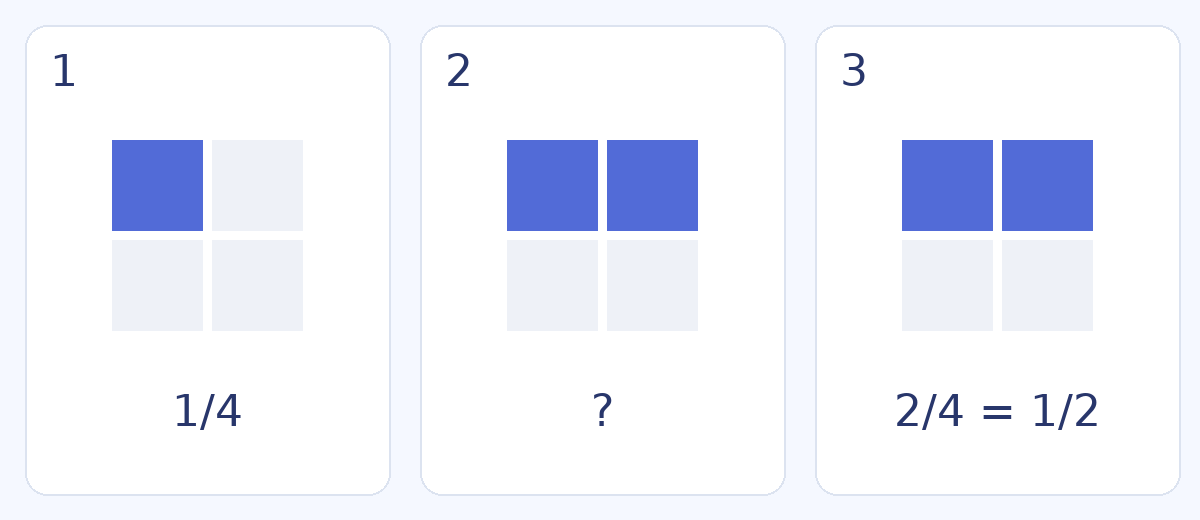
These passages belong to three separate shots. The English text explains the meaning; paste only the Darija into the generator. The illustration is a lesson storyboard, not a FasihTTS screenshot or generated audio output.
Keep the pause out of the spoken text
Do not paste “[wait five seconds]” between the question and answer and assume it will become silence. Keep production instructions in a separate editing note. Generate the question and answer separately, then control the gap in the video editor or course player.
The sample question asks the learner to pause the video. Use that instruction only where the player has a usable pause control. For an instructor-led lesson, replace it with wording that matches the actual activity. There is no single pause length that suits every learner and question.
Listen to a reference, then test your teaching terms
The recordings below are existing Moroccan Darija samples: Omar and Hala. Their scripts are promotional examples, not readings of this lesson. Use them to compare the voice and delivery, then test your actual sentence containing “الرّبع” and “النّص” when generation is available.
Listen for the meaning, not just a pleasant voice. Can the learner distinguish the two terms? Are “four equal parts” and “two parts” clear? If a phrase is unclear, revise that phrase and listen again before recording the remaining lessons.
كتقلب على شي حاجة زوينة لدارك؟ دوز عندنا للمحل، تفرج وخذ راحتك فالاختيار. وإلا بغيتي تسول على شي حاجة، حنا هنا باش نعاونوك. مرحبا بيك عندنا!
Try this voice with your textبغيتي هدية زوينة لشي حد عزيز عليك؟ اكتاشف مجموعتنا الجديدة، واختار اللي عجبك. التوصيل متوفر لجميع المدن.
Try this voice with your textReview the lesson in the player learners will use
- Check the diagram and audio together: equal parts must actually be equal, and the coloured count must match the spoken number.
- Check the pause and reveal on a phone. The learner should not see the answer early or lose the question when pausing.
- Review captions against the final audio, not an older script. Choose one clear spelling for recurring Darija terms.
- Keep separate explanation, question and answer files with versioned names. If the answer changes, replace the matching audio and caption together.
Choose production access after the pilot lesson works
Finish one representative lesson before estimating a whole course. Include the explanation, question, answer and likely replacement takes in your production plan. The delivered lesson length is not necessarily the total audio you will generate.
For a one-off course, compare the current Project Pack with monthly options. For recurring lesson production, compare the recurring allowance and renewal terms. Check current validity, usage and price on the pricing page; this guide does not promise a fixed number of finished lessons per plan.
Free previews are for evaluation and non-commercial testing. For audio used in a paid course, use the Project Pack or a paid subscription under the current Terms, and make sure you have the rights to the course material.